

Choosing the Right Cario Roles for Your Freight Team
27 July 2026

Learn how Cario roles and permissions help logistics, warehouse, finance and customer service teams control freight system access.
Freight operations depend on a lot of people doing different jobs at the right time.
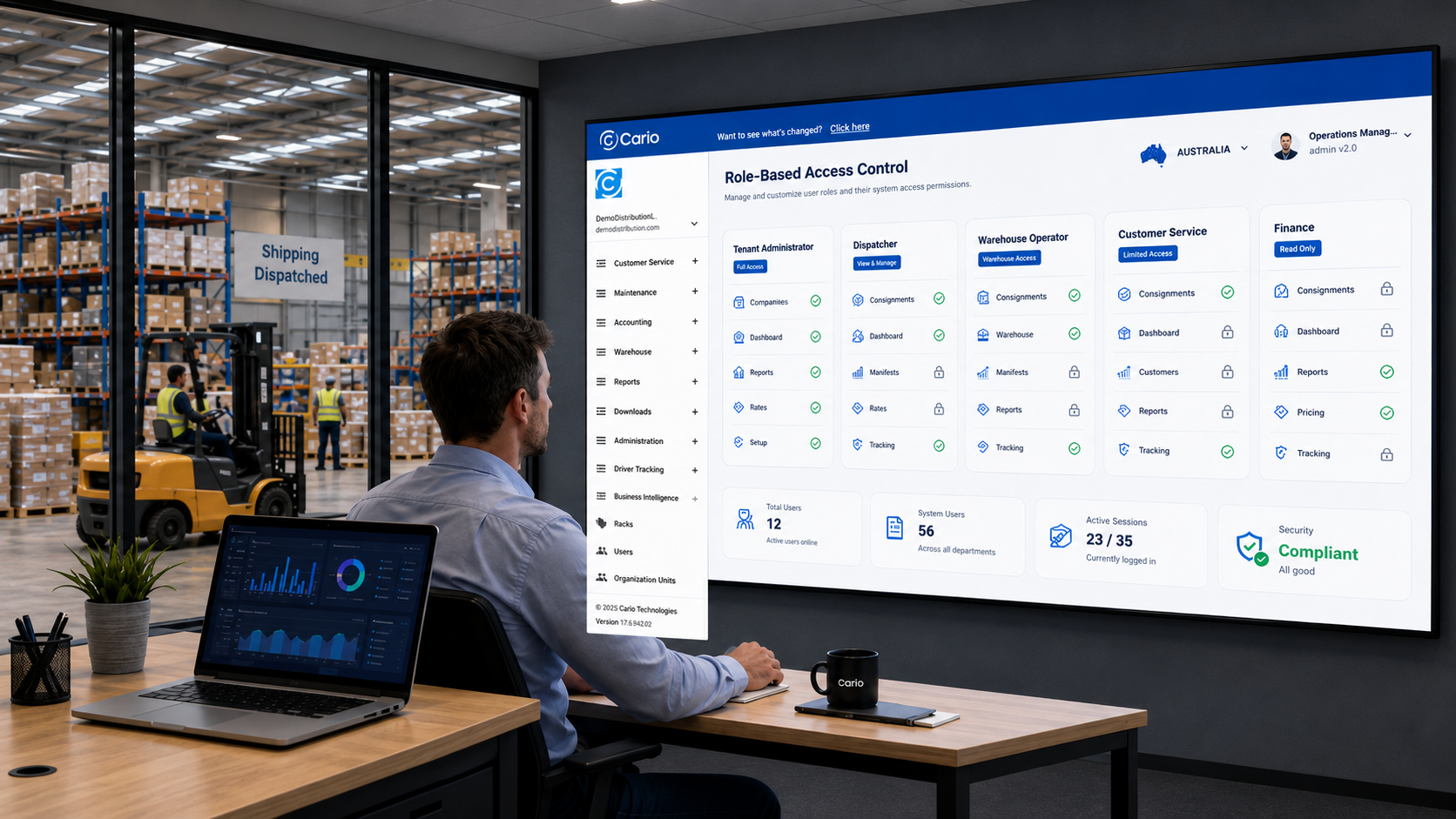
Your dispatch team needs to create consignments and manage carrier bookings. Your warehouse team needs to pack, scan and process freight. Customer service needs tracking visibility. Finance needs access to charges, invoices and reports. Your admin team needs control over users, roles and configuration.
The problem starts when everyone gets the same level of access.
Too much access can create pricing errors, accidental system changes and unnecessary security risk. Too little access slows people down and creates support requests.
Cario helps teams manage this through role-based access, so each user gets the permissions they need to do their job — no more, no less.
Why role mapping matters in freight operations
In a busy freight environment, system access is more than an IT task. It affects how fast your team can work, how well your data is protected and how much control you have over daily operations.
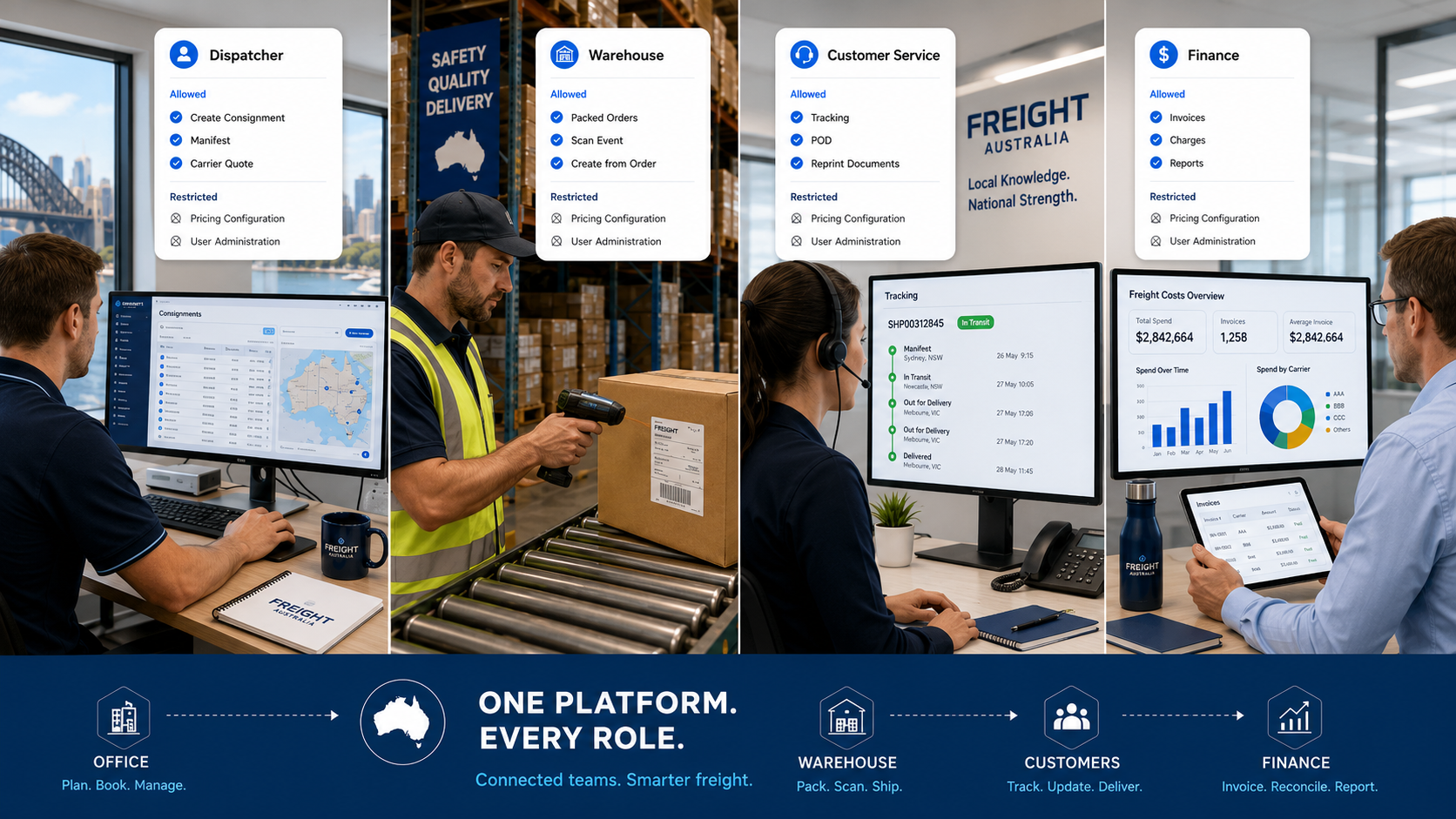
A dispatcher does not need the same access as a finance user. A warehouse operator does not need access to carrier pricing rules. A customer service user may need tracking visibility, but not the ability to create or delete consignments.
Clear role mapping helps your business:
Protect sensitive pricing and carrier data
Reduce accidental changes to rate cards or system settings
Keep warehouse, dispatch, finance and admin responsibilities separate
Speed up onboarding for new team members
Reduce training time and internal support requests
Improve accountability across freight and transport workflows
For growing logistics teams, that control becomes more important as freight volumes, carrier relationships and user numbers increase.
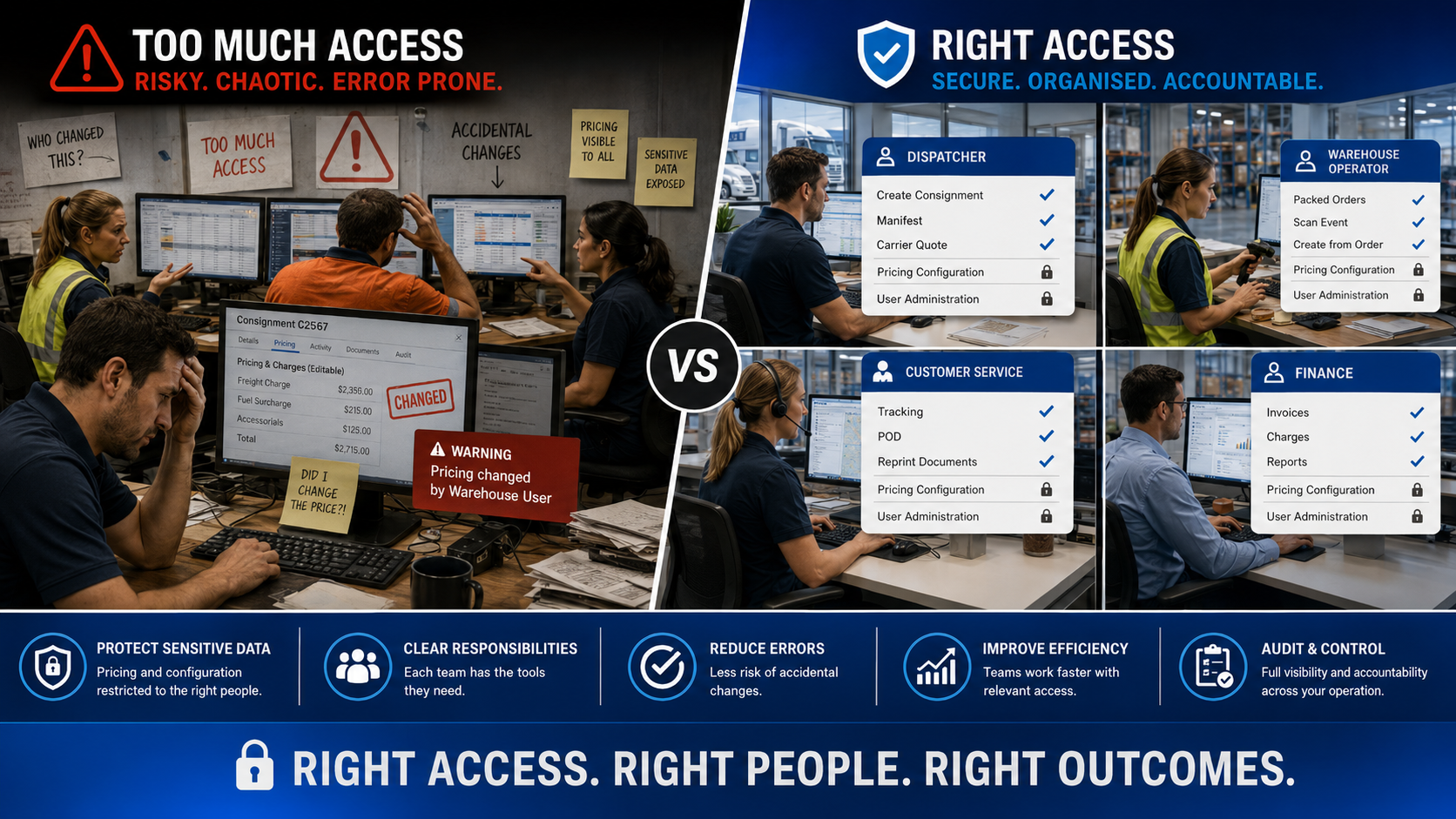
The risk of giving everyone too much access
Many businesses start with broad access because it feels easier.
A new staff member joins, so they get copied into an existing role. A manager needs one extra permission, so they receive admin-level access. A warehouse user needs to reprint labels, but ends up with pricing visibility as well.
That approach may work for a small team, but it creates risk as the business grows.
Common problems include:
Users changing consignments they should only be viewing
Pricing or carrier cost information visible to the wrong teams
System settings changed without the right approval
Finance and operations working from unclear permission boundaries
Admin teams spending more time fixing access issues
New users receiving inconsistent access across locations or teams
In freight operations, a small access mistake can flow into booking errors, reporting issues or customer service delays.
Match Cario roles to real-world responsibilities
The best way to set up Cario roles is to start with how your team actually works.
Before assigning a role, ask:
What does this person do each day?
Which Cario modules do they need?
Should they create, edit or only view consignments?
Should they see pricing, carrier costs or invoice data?
Are they operational, financial, supervisory or administrative?
Do they need access to Cario FMS, Cario Connect TMS, or both?
This keeps permissions tied to real job requirements instead of assumptions.
Common Cario role profiles by team
Tenant Administrator
This role suits system owners, senior IT users or platform administrators.
Tenant Administrators usually need broad access because they manage the platform at a higher level. Their access may include roles, users, configuration, reports, consignments, warehouse functions, controlled returns and finance visibility.
This role should be limited to a small group because it controls sensitive system areas.
Accounts and Finance
Finance teams need accurate freight data, invoice visibility and reporting access.
They may need to view charges, costs, consignments, invoices, manifests and reports. They may also need access to master data such as addresses, products or cost codes.
They should not usually need access to user administration, driver management or full tenant configuration.
Dispatch and Operations
Dispatchers and freight coordinators need access to the tools that support daily freight execution.
This may include creating and modifying consignments, quoting, manifesting, carrier selection, consolidation, status updates and controlled returns where relevant.
They should not usually have access to pricing configuration, tenant-level settings or user management.
Warehouse Operators
Warehouse users need a practical view of the work in front of them.
Their access may include orders, packed orders, packing workflows, event scanning, milestones and creating consignments from packed freight.
They should not need access to carrier costs, pricing rules, reporting exports or administration settings.
Customer Service
Customer service teams need visibility, not control over the full freight process.
They may need access to consignment status, tracking details, document reprints, proof of delivery visibility and return status where relevant.
They usually should not create consignments, change pricing or manage system configuration.
Sales and Commercial
Sales and account managers may need freight visibility to support customer conversations.
This can include quote visibility, consignment history, customer-level freight data and reports.
They should not need access to carrier costs, pricing configuration or admin settings unless there is a clear business reason.
Driver Supervisor
For Cario Connect TMS users, driver supervisors may need access to driver assignment, live map visibility, driver timelines, assessment policies, time approvals and notifications.
They usually should not need consignment creation, freight billing or finance permissions.
A simple role-mapping framework
Use this framework when reviewing user access.
Team member type | Main need | Access focus | Restrict |
Tenant Admin | System control | Users, roles, configuration, reporting | Limit to senior owners |
Finance | Cost and invoice visibility | Charges, reports, invoices, exports | User admin and driver setup |
Dispatch | Freight execution | Quotes, consignments, manifesting | Pricing configuration |
Warehouse | Packing and scanning | Orders, packed orders, event scanning | Carrier costs and admin |
Customer Service | Shipment visibility | Tracking, POD, reprints | Creation, pricing and settings |
Sales | Customer support | Quote and history visibility | Carrier costs and configuration |
Driver Supervisor | Fleet oversight | Drivers, live map, timelines | Billing and finance access |
Best practice tips for managing Cario roles
Role management works best when it is reviewed regularly, not only when something goes wrong.
A practical approach is to:
Start with standard role profiles
Adjust permissions based on the user’s actual responsibilities
Keep admin permissions limited
Separate finance, warehouse, dispatch and customer service access
Avoid “just in case” access
Review roles when staff move teams or responsibilities change
Remove access that is no longer needed
This helps your business keep freight operations moving without giving away more control than required.
Why this matters as your freight operation grows
As freight volumes increase, more people touch the process.
A single consignment may involve warehouse staff, dispatch, customer service, finance, carriers, drivers and managers. Each team needs visibility into the right part of the workflow.
Role-based access helps Cario customers keep those responsibilities clear.
Warehouse users can focus on packing and scanning. Dispatch teams can manage freight execution. Customer service can answer delivery questions faster. Finance can review costs and invoices. Admin teams can manage the system without handing out broad access to everyone.
That structure supports better security, cleaner operations and less confusion across teams.
FAQ
What are Cario roles used for?
Cario roles control what each user can access and what actions they can perform in the platform. This helps businesses match system access to each person’s job.
Why should freight teams avoid giving everyone admin access?
Admin access can expose sensitive pricing, carrier settings and configuration tools. Limiting admin access reduces the risk of accidental changes and keeps control with the right people.
Should customer service teams be able to create consignments?
In most cases, customer service teams only need tracking and document visibility. Consignment creation is usually handled by dispatch, operations or warehouse teams.
Can finance users see freight costs and reports?
Yes, finance users can be set up with access to charges, invoice information and reporting where required. Access should match the finance team’s responsibilities.
Do warehouse users need pricing access?
Usually, no. Warehouse users typically need access to orders, packed orders, scanning and freight processing tasks, not carrier pricing or system configuration.
How often should Cario roles be reviewed?
Roles should be reviewed when staff change roles, teams grow, new modules are introduced or access issues appear. A regular review also helps remove permissions that are no longer needed.
Who should manage roles and users in Cario?
Tenant Administrators or System Administrators should manage roles and users. These permissions should be restricted to trusted system owners.
Ready to bring more control to your freight operations?
Cario helps logistics teams manage freight, transport, users and visibility from one connected platform.
Book a demo to see how Cario can support secure, role-based access across your freight operation.